Shopify is one of the best platforms an ecommerce founder can build on. It’s fast, it’s reliable, and it handles the messy parts of running a store so you don’t have to. But it ships with one structural default that works against your SEO, and most merchants never notice it, because it’s invisible to shoppers and tucked away inside the theme code.
The problem lives in your product URLs. Left alone, Shopify’s default behaviour hands search engines two web addresses for a single product. Sometimes four. Sometimes eight. Google then has to guess which one is the real page, and when it guesses wrong, your rankings wobble and your backlinks scatter.
The good news is that fixing this is one of the cleanest technical wins available to a Shopify store. It costs nothing but a few minutes in your theme editor.
Here’s exactly what’s happening, and how to put it right.
First, how Shopify builds your product URLs
Google treats every unique web address as a separate page. Two URLs can show identical text, identical images, and an identical layout, but a different path tells the crawler it’s looking at two different things.
When you upload a product, Shopify creates one clean, direct address for it:
yourstore.com/products/product-name
This flat path is exactly what you want because it’s short, it’s permanent, and it tells crawlers precisely what the page is about.
The trouble starts the moment you add that product to a collection. To keep shoppers oriented as they browse, Shopify automatically generates a second address that bakes the collection name into the path:
yourstore.com/collections/category-name/products/product-name
Now put one product into four collections. Shopify produces four nested paths on top of the flat one. Your customers see the same page no matter how they arrive, but Google sees five different URLs for a single item.
And it compounds fast. A 500-product store where each product sits in just one collection already generates more than 1,000 crawlable URLs. Layer in variants and sort parameters, and a single product can spawn a dozen addresses. That leaves Google with thousands of near-identical pages to crawl, sort, and rank.
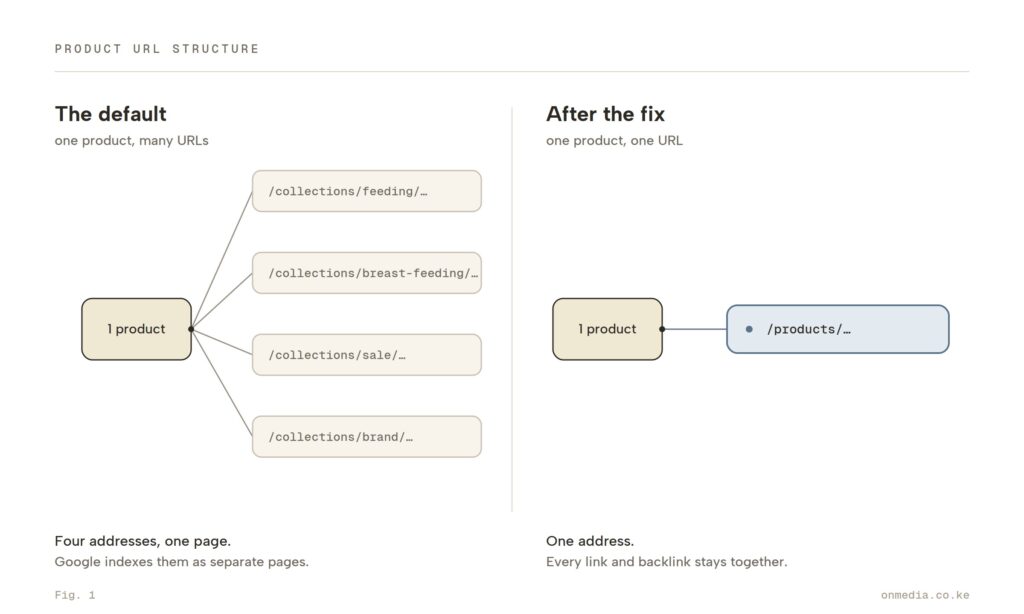
A real example, and a word before we get into it
To make this concrete, it helps to look at a real store rather than a made-up one. We’ve chosen Peekaboo, Kenya’s largest baby and kids retailer, and we want to be upfront about why.
This is not a teardown, and it isn’t a knock on Peekaboo or the team behind it. Quite the opposite. Peekaboo is one of the best-run ecommerce operations in the region, an award-winning store carrying more than 10,000 products, with several physical outlets and same or next-day delivery across Nairobi. We’re using them precisely because they’re a serious, well-built store.
The behaviour we’re about to point out isn’t a mistake anyone made. It’s a Shopify default that ships with nearly every store on the platform. Theirs has it, we’ve seen it on far too many stores, and almost certainly yours does too. If anything, a catalogue their size is the perfect way to show how quickly the issue scales.
With that said, here’s what the default looks like in practice.
Take one real product, the Me & Mommy Breast Milk Storage Bags. Its clean, canonical address is:
peekaboo.ke/products/me-mommy-breast-milk-storage-bags
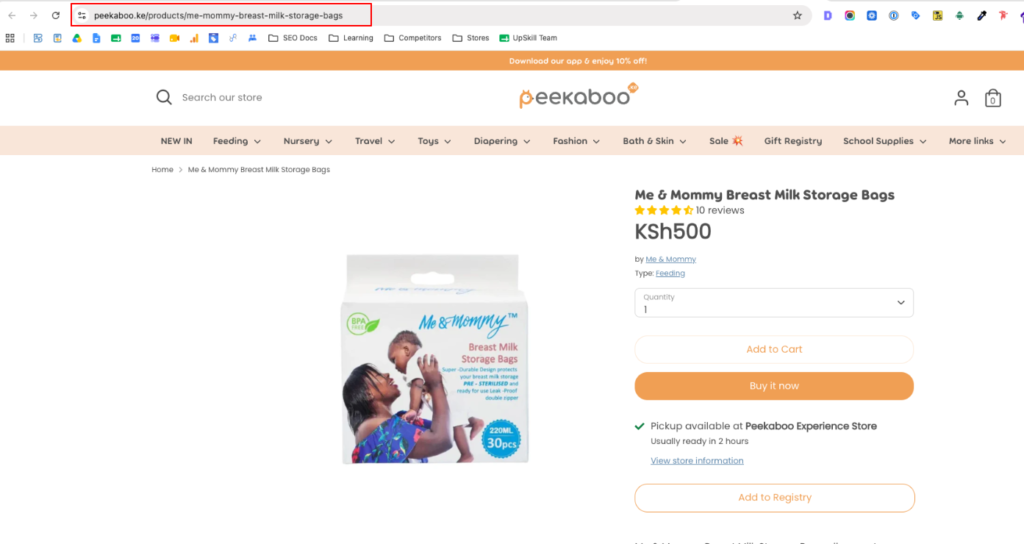
That’s the version you’d want Google to rank, and to Peekaboo’s credit, that’s exactly where the page’s canonical tag points. But the same product also sits inside the Breast Feeding category, and browsing to it that way produces a second, longer address:
peekaboo.ke/collections/breast-feeding/products/me-mommy-breast-milk-storage-bags
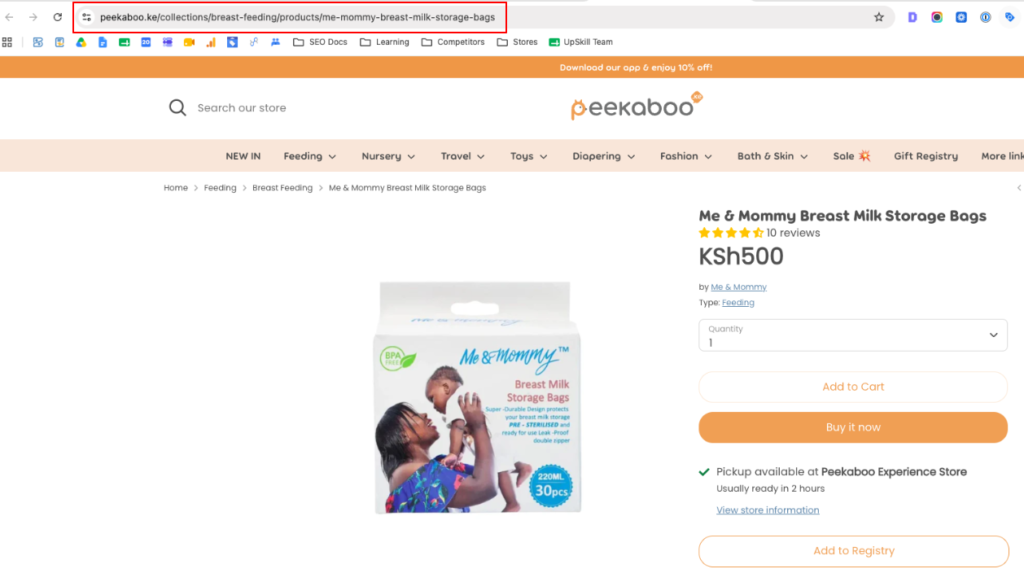
Open either one and you land on the identical page, with the same photos, the same price, and the same description.
Add the product to a sale or a brand collection and you’d get a third and fourth variation in the very same pattern.
To a shopper it’s all one page but to Google it’s several.
Now picture that across a catalogue of more than 10,000 products, many of them sitting in two or three categories at once, and you can see how a store quietly accumulates a very large pile of near-identical URLs. None of it is unique to Peekaboo. It’s simply what Shopify does out of the box.
“But Shopify adds canonical tags, so I’m fine.” Not quite.
This is where most merchants stop worrying, and it’s where they go wrong.
Shopify does add a canonical tag to every page. A canonical tag is a line in the page’s code that says, in effect, “You may have arrived at this collection URL, but the master version of this page lives at the flat product URL, so index that one.” On paper, it solves the whole problem.
In practice, it often doesn’t. Google’s own position is that a canonical tag is a hint, not a rule. It’s one signal among several, and Google reserves the right to overrule it.
Industry analyses put that override rate at roughly 30 to 40 percent of canonical tags whenever other signals contradict them. That isn’t a rounding error, it’s a meaningful slice of your catalogue left exposed.
So what contradicts the tag?
A number of factors do, starting with your own internal links.
By default, every product card on your collection pages links to the nested collection URL rather than the flat one. Check the highlighted link on the image below.
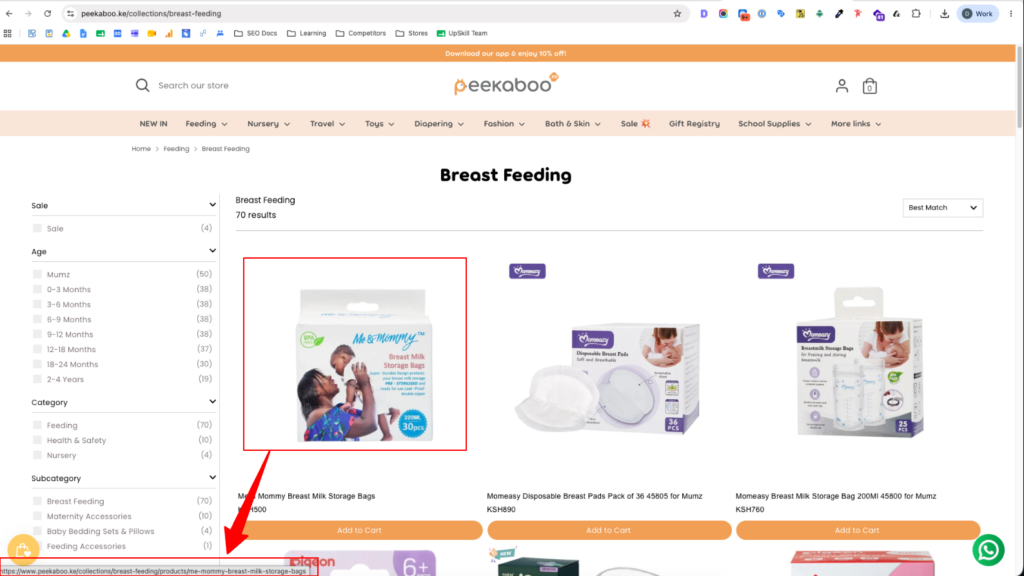
So Google crawls your store and runs into a contradiction. Your navigation votes overwhelmingly for the collection path, while your canonical tag points to the product path. Faced with two answers, Google often sides with the internal links and indexes the nested URL instead.
The root cause was never the canonical tag. It’s that your internal linking and your canonical tag have been pointing at two different addresses all along.
What this actually costs you
When Google can’t confidently pick the master version of a page, three things tend to follow.
The first is duplicate and thin-content flags.
Index the collection path, and Google may turn around and treat your clean product path as the duplicate. In Search Console, this surfaces as “Duplicate without user-selected canonical” or “Duplicate, Google chose a different canonical than user.” Either way, your indexation gets unstable.
The second is rankings that refuse to settle.
One week the collection URL ranks, the next week the product URL does, and over time both can lose ground as the two versions compete for the same keywords. It’s a self-inflicted form of cannibalisation.
The third is backlinks that split instead of stack.
When a blogger, a customer, or an influencer shares your product, they copy whatever’s in their address bar. If they found the item through a collection, they share the nested link. Your hard-won authority then gets divided across several versions of the page instead of concentrating on one, so no single URL ever grows strong enough to win.
There’s a quieter cost on top of those: wasted crawl budget.
See… Google gives your site a finite amount of crawling, and every duplicate URL it has to process is attention it isn’t spending on discovering your new products or recrawling updated inventory.
How to fix it
The fix is a small edit to your theme’s Liquid code. The goal is simple. You want your collection pages to link directly to the clean, flat product URL, so that your internal links and your canonical tag finally agree.
Before you touch anything, duplicate your live theme as a backup. If something looks off afterward, you can revert in a single click.
Step 1. Open the code editor. In your Shopify admin, go to the Online Store, then Themes. Find your live theme, click the three dots, and choose Edit code.
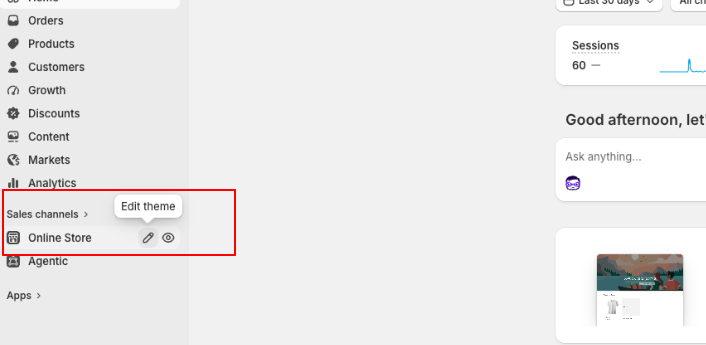
Step 2. Find the product card snippet. Products on collection pages are rendered by a reusable card. In your Snippets folder, look for one of these files, depending on your theme:
- card-product.liquid
- product-grid-item.liquid
- product-thumbnail.liquid
Step 3. Remove the collection filter. Inside the file, search (Ctrl/Cmd + F) for the product link. It usually looks like one of these two lines:
href=”{{ card_product.url | within: collection }}”
href=”{{ card_product.url | within: current_collection }}”
That within: collection filter (some themes write it as within: current_collection) is what forces the collection name into the URL. Delete the pipe and the filter so the line reads simply:
href=”{{ card_product.url }}”
Step 4. Save and test. Click Save, open an incognito window, go to a collection page, and hover over any product. The link preview at the bottom of your browser should now point straight to /products/… with no collection in the path.
One important clarification
This edit does not delete your collection URLs, and it shouldn’t. Those pages stay live for anyone who reaches them directly, and they keep their canonical tags pointing back to the product page.
What you’ve changed is the signal. Your internal links now all point to the flat product URL, so they reinforce the canonical instead of fighting it. Google finally gets one consistent answer from every direction.
And to be clear, don’t no-index your collection product URLs as a “fix.” That just creates a different conflict. Aligning the internal links is the clean way through.
Confirming it worked
Give Google a few weeks to recrawl, then open Search Console, go to Indexing, then Pages. You’re watching for the duplicate-related buckets to shrink over time and your clean /products/ URLs to settle in as the indexed versions.
You can also use the URL Inspection tool to check individual products and request reindexing of the canonical version. Most stores see the duplicate URLs fall out of the index within four to eight weeks.
When to call in help
The Liquid edit is straightforward on most standard themes. It gets trickier if you’re running a heavily customised build, a legacy theme, or filtering apps that generate product links dynamically with JavaScript. In those cases the standard fix won’t catch everything, and guessing inside live theme code can break collection layouts or quietly de-index your best sellers.
If you can’t find the right snippet, or the edit changes your layouts in ways you didn’t expect, that’s the moment to bring in someone who does this every day. At OnMedia we handle this kind of technical seo implementation for ecommerce brands, so the mechanics stay airtight while you focus on the parts of the business only you can run.
The bigger point
Great products and sharp copy get you halfway. The other half is structural. It comes down to clean URLs, efficient crawling, and internal links that all point the same direction. That’s what quietly decides which stores hold the top positions, rather than trading them back and forth week after week.
Enforcing a single, flat URL for every product means every bit of internal authority and every external backlink flows to one permanent destination, which is exactly where it can do the most work. So audit your store’s product links today. It’s a fifteen-minute check that goes on paying off for years.