On 26 October 2026, Shopify moved Knowledge Base into the main admin. If this sounds like a foreign concept to you, the Shopify Knowledge Base is the page where you decide what AI shopping agents are told about your store, such as where you deliver, how returns work and how people can pay.
If you sell on Shopify, it is worth reviewing this week, because some of those facts may already be live without anyone at your business having checked them.
Our view is straightforward.
Knowledge Base changes how accurately AI describes your business. It does not change how often AI recommends you, and its most useful side effect is showing you which buying questions your website can’t answer.
This guide walks through what Shopify’s changelog says, what it means in practice and how to review your own store.
Most Shopify stores should review Knowledge Base before 15 January 2027
Here is what you need to know before reading further:
- Knowledge Base now sits at Sales channels → Agentic → Knowledge base, and the standalone app stops working after 15 January 2027.
- It holds facts about your store rather than your products, including policies, delivery options, payment methods, contact details, gift services and brand information.
- Facts Shopify scans from your storefront stay unpublished until you publish them. Facts pulled from your admin, such as store policies and contact details, are published automatically.
- Each store can hold up to 1,000 facts.
- Shopify presents Knowledge Base as a way to improve how accurately AI describes you, and makes no claim that it affects how often AI channels recommend you.
Shopify’s changelog makes five points that matter to merchants
Shopify’s changelog entry of 26 October 2026 is short. Here is each point it makes and what it means in practice.
| What Shopify announced | What it means for your store |
| Knowledge base now sits in the admin under Sales channels → Agentic | It sits next to your other AI channel settings. The store owner, or staff with the Agentic permission, can manage it. |
| It replaces the standalone app, which ends on 15 January 2027 | The app can no longer be installed. Anything you kept only in the app needs to be in the new page before that date. |
| One page lets you review, edit and publish the facts AI agents receive about your store | These are the answers an AI agent looks up when a shopper asks about your store. Shopify makes them available through Storefront MCP, a standard connection that AI tools, including Shopify’s own Shop app, can use to ask a store questions. |
| Shopify drafts facts from your published storefront pages and links each one to its source | You start from a draft rather than a blank page, and you can check every fact against the page it came from. |
| Drafted facts don’t reach AI agents until you publish them | This applies to facts scanned from your storefront. Facts tied to your admin, such as store policies and contact details, are published as soon as Shopify creates them. |
The last row is the one to act on first. An untouched Knowledge Base may already have published facts in it, so check what is live before anything else.
Whether you need to migrate depends on how you used the old app
Shopify has handled the move to the new Knowledge Base differently depending on whether a store used the standalone app, and how many facts it held there.
| Your situation | What Shopify did | What to do before 15 January 2027 |
| You never used the Knowledge Base app | Nothing needed migrating. Shopify has already drafted facts from your storefront. | Review the drafts and publish the accurate ones. Until you do, scanned facts are not available to AI agents. |
| You used the app and had up to 1,000 facts | The facts you wrote or edited were moved over and published for you. | Check them, because anything outdated is already live. Unpublish whatever is wrong. |
| You used the app and had more than 1,000 facts | Nothing moved over. Shopify emailed these stores directly. | Add back the facts you want to keep. The new page holds 1,000 facts in total, so prioritise the ones shoppers actually ask about. |
Shopify’s changelog and Help Center describe the 1,000-fact threshold slightly differently. If your store is close to that number, check what landed in your admin rather than relying on either description.
Knowledge Base covers what it is like to buy from you, while Catalog covers what you sell
Shopify Catalog handles product information such as titles, descriptions, images, prices, variants and availability. Knowledge Base handles everything around the purchase. Shopify’s Help Center describes it as the source of truth for all non-product information about your store.
Shopify groups Knowledge Base facts into categories, and each category answers a question shoppers ask before they buy. The questions in the right-hand column are illustrations, written the way a shopper in Kenya might put them.
| Category | What it covers | The shopper’s question |
| About the store | Description, audience, ownership, history, business model | “Is this a real business?” |
| Brand and identity | Your own brands, brands you stock, values, aesthetic | “Do they sell the genuine product?” |
| Company policies | Terms, privacy, shipping and returns policies; flags any that are missing | “What am I agreeing to?” |
| Contact | Address, email, phone, social profiles | “How do I reach them if something goes wrong?” |
| Payment | Payment methods accepted at checkout | “Can I pay with M-Pesa?” |
| Fulfillment | Shipping and delivery types, such as international, express or in-store pickup | “Do they deliver outside Nairobi?” |
| Returns and warranty | Return window, refunds, warranty, self-serve returns link | “What if it doesn’t fit?” |
| Gift services | Gift cards, gift receipts, registry, wrapping | “Can I send this as a gift?” |
| Second hand | Whether you sell pre-owned products | “Is this new?” |
| Additional facts | Anything else you add yourself | “Do you take bulk orders?” |
Additional facts come in three formats. Use Yes/No for questions with a single yes or no answer, Tags for short lists such as materials or certifications, and Paragraph for anything that needs explaining.
Shopify rescans your store regularly and shows changes as suggested updates, and it never edits your Knowledge Base without your approval. Scans can miss changes, though, so edit important facts directly. If your store is password-protected, Shopify can only use information from your admin.
Knowledge Base will not get your store recommended more often
Getting a store into AI answers involves two separate problems.
The first is discovery, which is whether an AI tool surfaces your brand or products at all. The second is representation, which is whether what it says about you is accurate once you are part of the conversation.
Knowledge Base deals with representation. Shopify’s Help Center presents it as a reliable source agents can query to answer questions about your store accurately, and it makes no claim about which stores get recommended.
On the product side, Shopify’s Catalog documentation says plainly that each AI channel controls its own ranking, wording and shopping experience.
What we don’t know yet is how much weight each AI channel gives Knowledge Base facts compared with what it reads on your own website. Until there is evidence either way, we would treat the two as sources that need to say the same thing.
Kenyan merchants should check which AI channels are live for their store
Several of Shopify’s AI channels are still in early access or limited to certain markets, and availability changes often.
The reliable place to see what applies to your store is Sales channels → Agentic in your own admin.
Your published Knowledge Base is still available through Storefront MCP wherever you sell, so it is worth getting right even if some channels haven’t reached your market.
Local buying questions deserve particular attention. If your answers about delivery zones, delivery fees or paying with M-Pesa live only in WhatsApp chats, Shopify’s scan can’t find them, and neither can an AI agent.
Seven steps to review your Shopify Knowledge Base this week
Shopify will generate plenty of facts for you, but a generated fact still needs checking. Read each one the way a customer would.
- Open Shopify admin, then Sales channels → Agentic → Knowledge base.
- Check what is already live first. Facts from your admin, such as policies and contact details, and anything migrated from the old app are already published.
- Look at the Policies section, which flags any policy that is missing. Write the missing policy in your Shopify admin so it appears on your store as well.
- Review each scanned draft and ask whether a shopper could make a buying decision on it without being misled. Publish only the ones that pass.
- When a fact is wrong, correct the page it came from first, then update the fact.
- Add the questions customers keep asking, such as delivery zones and fees, pickup points, payment options, bulk orders and warranty claims. Your WhatsApp and Instagram messages are usually the best record of what people want to know.
- Keep it current by approving or rejecting suggested updates as they appear. After a policy change, edit the fact directly rather than waiting for the next scan.
Gaps in your Knowledge Base usually point to gaps on your website
Shopify drafts Knowledge Base from your storefront, so the facts it can’t find are often facts your website doesn’t explain well.
Say Shopify can’t work out where you deliver, how your warranty works or whether customers can collect orders. You could type those answers into Knowledge Base by hand. The better question is why the information was so hard to find on your site in the first place.
Usually the content is missing, or it exists but is buried on a page nobody visits, or it is too vague to pull a clear answer from. If a scanner can’t find a clear answer, a shopper probably can’t either, and neither can a search engine.
Shopify’s own guidance points the same way. It asks that what you add to Knowledge Base matches your storefront and links to a public page. Fixing the page helps shoppers and search engines as well as AI agents, while adding a fact only to Knowledge Base helps AI agents alone.
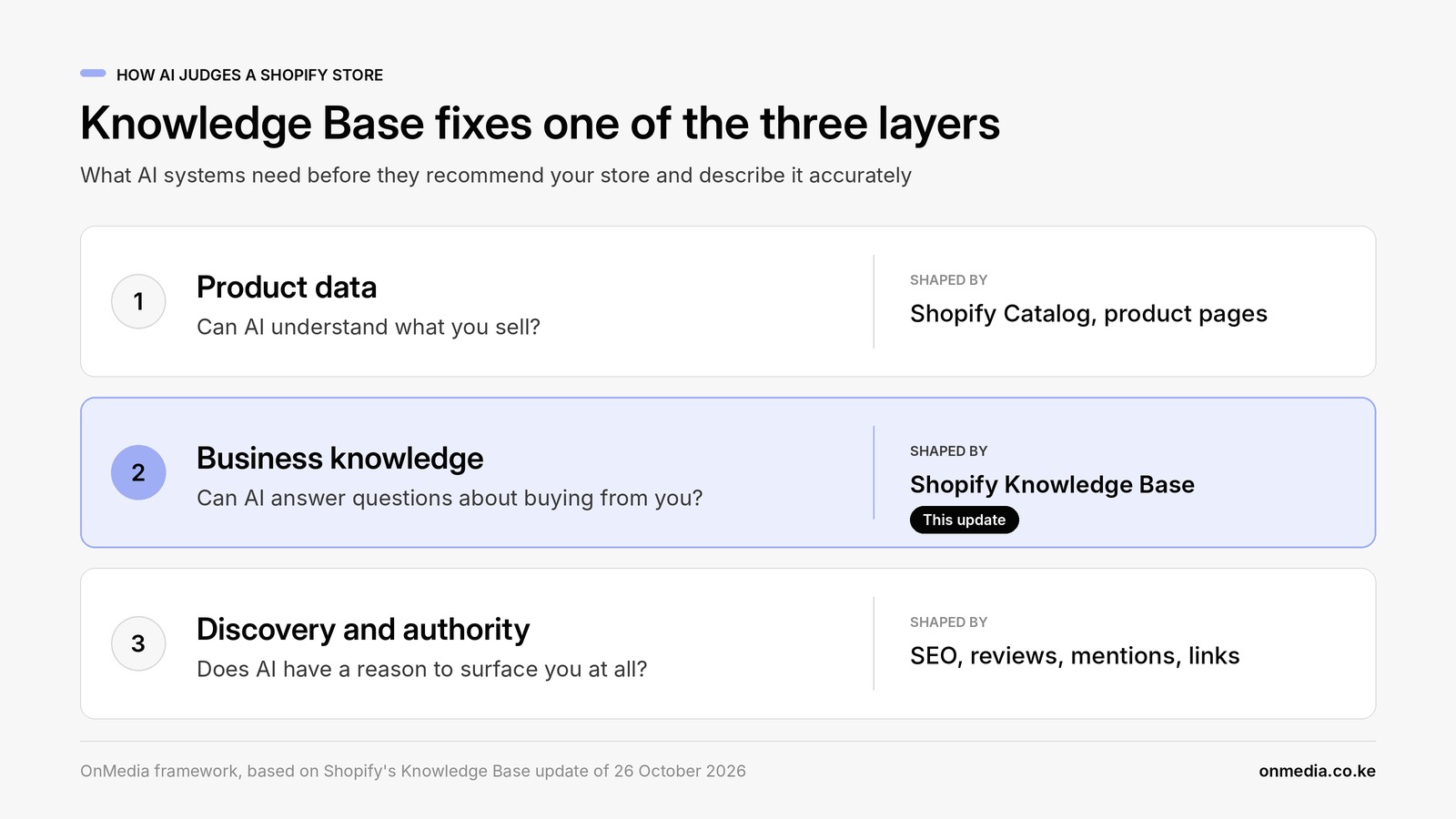
Knowledge Base strengthens one of the three layers AI uses to judge a Shopify store
We find it useful to split AI commerce optimization for Shopify stores into three layers. Knowledge Base works on the middle one.
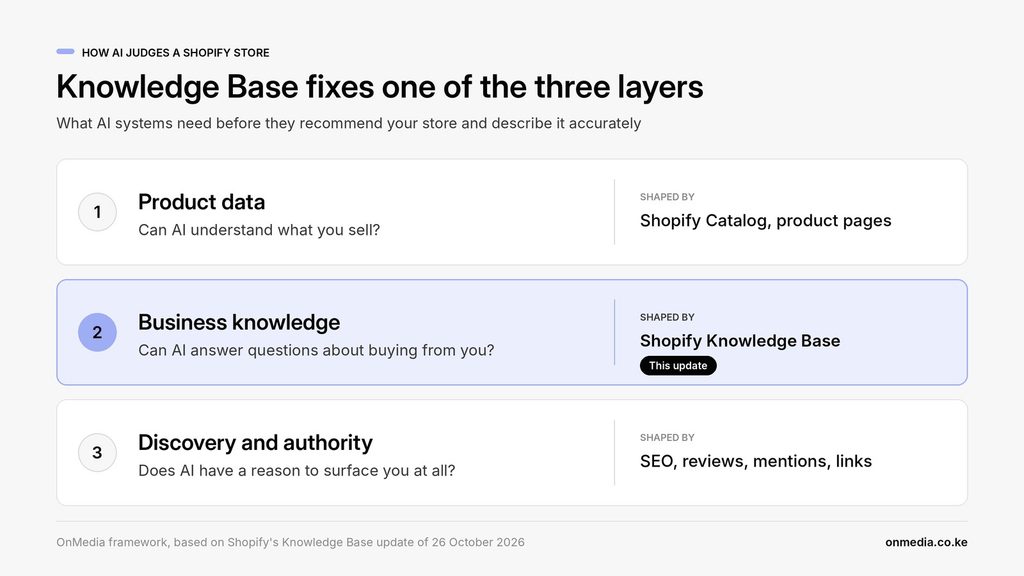
The three layers depend on each other. Accurate store facts don’t help if AI never surfaces you, and being surfaced doesn’t help much if the AI then gets your returns policy wrong.
The most valuable part of the review is the list of questions your website couldn’t answer
Publishing accurate facts in Knowledge Base takes an afternoon, and it is worth doing before 15 January 2027. Recommendations from AI will still depend on your product data, your website and what the rest of the web says about you.
So keep the list of facts Shopify couldn’t find, or found only in vague form. Those gaps were costing you with shoppers and search engines long before an AI agent asked about them.
If you’d like a second opinion on your own store, see how we check AI visibility for Shopify stores.